Nanopore workflow
4760 words
23 minutes
4760 words
23 minutes
For this exercise, we are only working with their depletion dataset, as that workflow is best aligned with the sequencing approach of this workshop. The goal of this process is to use NAS for real-time metagenomic surveillance, targeting pathogen detection in field-collected samples. This approach allows for selective sequencing of desired genomic regions. By performing these steps, we can efficiently map sequencing reads to reference genomes, filter out host sequences, and perform homology searches against known pathogen databases. This workflow mirrors the methodology described in Kipp et al. (2023)
Before starting with Step 1: (1) install the Required Software. (2) make sure you have downloaded Kipp’s data as instructed in Getting Ready.
In this step, we are using basic Linux commands to establish our file/folder structure. Mac and Linux users may open a terminal. Windows users should open their Ubuntu terminal via WSL (Search “Ubuntu,” in search bar).
Print your working directory (i.e., determine where your terminal window is located within the file structure of your computer):
pwd # type this command and hit enter25
In Ubuntu (and other linuxes), your ‘home’ folder (generally know as $HOME) will, by default, contain a collection of folders, including one called Public. Home directory for Windows users via Ubuntu should be:
\\wsl.localhost\Ubuntu\home\<USERNAME> # <USERNAME> was defined when installing Ubuntu
This will show you :
\\wsl.localhost\Ubuntu\home\<USERNAME>\field_genomics\data_example # <USERNAME> was defined when installing Ubuntu
To take you to your home directory on any deivce use change directory (cd is the command):
cd ~
Make a directory, also known as a folder, (mkdir is the command) for this workflow:
mkdir field_genomics/Navigate into that directory:
cd ~/field_genomics/Create new subdirectories to store example data, store results, and store a BLAST database, :
mkdir data_example/
mkdir output_example/
mkdir blast_database/
mkdir summary_example/
Copy or move the 3 data files from Getting Ready into the data_example/ directory. This can be done in a File Manager or Finder window via drag-and-drop or via the command line. Ensure that the files downloaded are named as follows, as sometimes downloading/extracting zip files from Google Drive can change file names:
Kipp_etal_depletion_reference.fasta
SRR17281099.fasta.gz
Kipp_etal_enrichment_reference.fasta
Example code for transferring these files from your Downloads/ folder to the data_example/ folder and then going bsck to your field_genomics folder. you can also just drag these from your Downloads folder using Finder or File Explorer:
cd Downloads/
mv SRR17281099.fasta.gz /<YOUR_PATH>/field_genomics/
mv Kipp_etal_* <YOUR_PATH>/field_genomics/
cd ~/field_genomics/
Note: For Windows users, ensure that your computer does not suspend while running analyses. You need to repace <YOUR_PATH> with the output of your pwd command from above.
Burrows-Wheeler Alignment (BWA) is a software package that is used to align reads to a reference genome. First, we must index the reference genome. Indexing a reference genome is a process that speeds up sequence alignment by creating a data structure, allowing rapid matching of DNA sequences (reads) to the reference genome. This is how to index a reference genome:
data_example/Kipp_etal_depletion_reference.fastabwa index data_example/Kipp_etal_depletion_reference.fastaInput: Reference Genome
>chr1
AGCTTAGCTAGCTACGATCGATCG
>chr2
GCTAGCTAGCTAGCTGATCGTACG
Indexing with BWA
.amb,.ann,.bwt,.pac,.sa) such as suffix arrays or FM-indexes, that make the search process more efficient.Description: This step aligns the Nanopore sequencing reads to the reference genome. BWA-MEM is the algorithm in BWA that is best for aligning long reads (70bp or more). SAM files (the ouput file format of this step) are a formatted, plain-text file that contains aligment information for sequences mapped to a reference. SAM (Sequence Alignment Map) files can also contain unmapped sequences. It will take a few minutes.
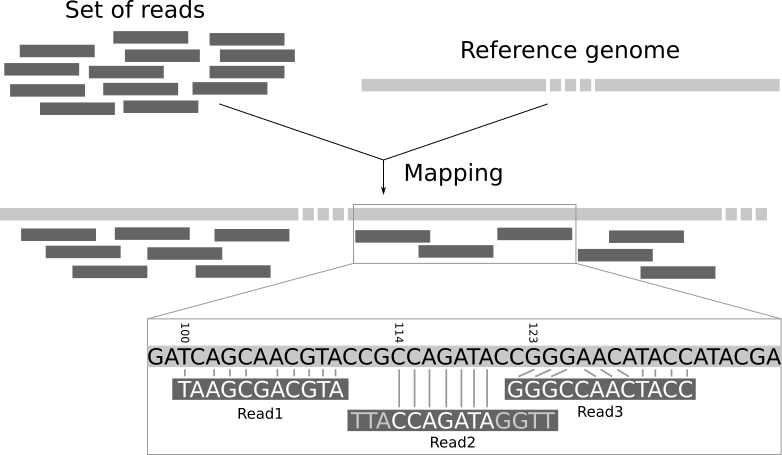
Photo credit: Galaxy
data_example/Kipp_etal_depletion_reference.fastadata_example/SRR17281099.fasta.gzoutput_example/Kipp_etal_alig_depletion.sam#template command for Nanopore reads: bwa mem -x ont2d <reference_genome.fasta> <raw_reads.fasta.gz> > <output.sam>
bwa mem -x ont2d ./data_example/Kipp_etal_depletion_reference.fasta ./data_example/SRR17281099.fasta.gz > output_example/Kipp_etal_alig_depletion.sam
# -x is a flag to specify specialized alignment stratagies, in this case, ont2d = Oxford Nanopore ReadsDescription: Here, we remove reads that mapped to the host genome, retaining only unmapped sequences in a separate fasta file. These sequences represent reads that are NOT the host (e.g., bacterial DNA, fungal DNA, contamination, etc.).
output_example/Kipp_etal_alig_depletion.samoutput_example/Kipp_etal_unmapped_depletion.fastasamtools fasta -f 4 ./output_example/Kipp_etal_alig_depletion.sam > ./output_example/Kipp_etal_unmapped_depletion.fasta
#samtools -f is a flag that means "flag." In this case, we specify 4, which translates to filter that fasta file to keep only unmapped sequencesDescription: samtools is a suite of programs used for interacting with high-throughput sequencing data. It consists of samtools, BCFtools, and HTSlib.
Description: Next, we want to build a local database of tick-borne pathogen sequences. We will then compare our unaligned Nanopore reads to that database of reference pathogen sequences and use the percent identity (or percent similarity) to determine which pathogens are present in the Nanopore sequence data. We will use National Center for Biotechnology Information’s (NCBI) BLAST (Basic Local Alignment Search Tool) tool to both (1) build the local database of know pathogens and (2) compare our data to it. The pathogen sequences used to build the reference database can be mined from GenBank/SRA, DDBJ, EuPathDB, or other sequence databases. Here, we build a database from the enrichment fasta file from Kipp et al. (2023) that contains 52 partial or complete genomes of tick-borne pathogens (see their Supplementary Table 1 ).
makeblastdb -in ./data_example/Kipp_etal_enrichment_reference.fasta -parse_seqids -blastdb_version 5 -title "Kipp_etal_enrichment" -dbtype nucl -out ./blast_database/Kipp_etal_enrichment_reference

#-blastdb_version 5 = Version of blastdb you would like. Version 5 (taxonomy aware) is the default starting with the 2.10.0 release. Value must be 4 or 5.
# -title "Kipp etal_enrichment" = 	Title for BLAST database. If not set, the input file name will be used
# -dbtype nucl = Molecule type of input, values can be nucl or prot.Description: The above line of code creates a local BLAST database from the sequences in Kipp et al.’s (2023) enrichment fasta file. This database will be used as a reference against which we can compare our Nanopore sequence data to determine what pathogens are present in the sample.
blastn -query ./output_example/Kipp_etal_unmapped_depletion.fasta -db ./blast_database/Kipp_etal_enrichment_reference -out output_example/Kipp_etal_blast_results.txtDescription:
This step uses the BLAST algorithm to search for each unmapped Nanopore sequence in the local pathogen reference database, and produce a text file with subject-query matches. In this context, the subject is the reference pathogen sequence and the query is the unmapped Nanopore read. A match occurs when there is >70% identity between the subject and query.
To summarize the BLAST results, run another BLAST query defining a tab-delimited output: -outfmt 6.
blastn -query ./output_example/Kipp_etal_unmapped_depletion.fasta -db ./blast_database/Kipp_etal_enrichment_reference -out ./output_example/Kipp_etal_blast_results_table.txt -outfmt 6
	#Options supplied to -outfmt (out format) can be customized to include alignment length,      percent identity, etc.
BLASTn tabular output format 6 guide:
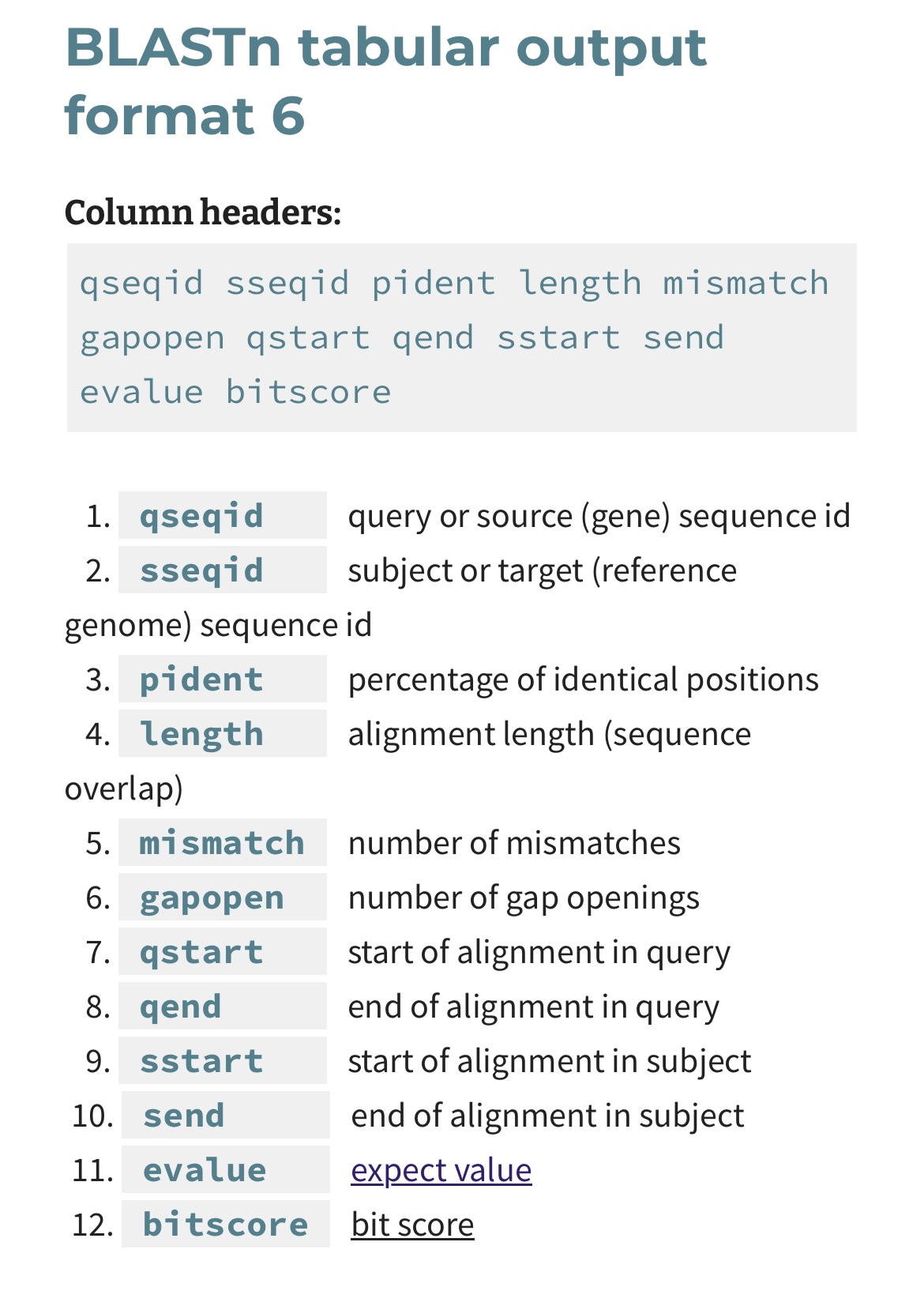
Here, we can take a look at what a small part of our default BLAST query output looks like:
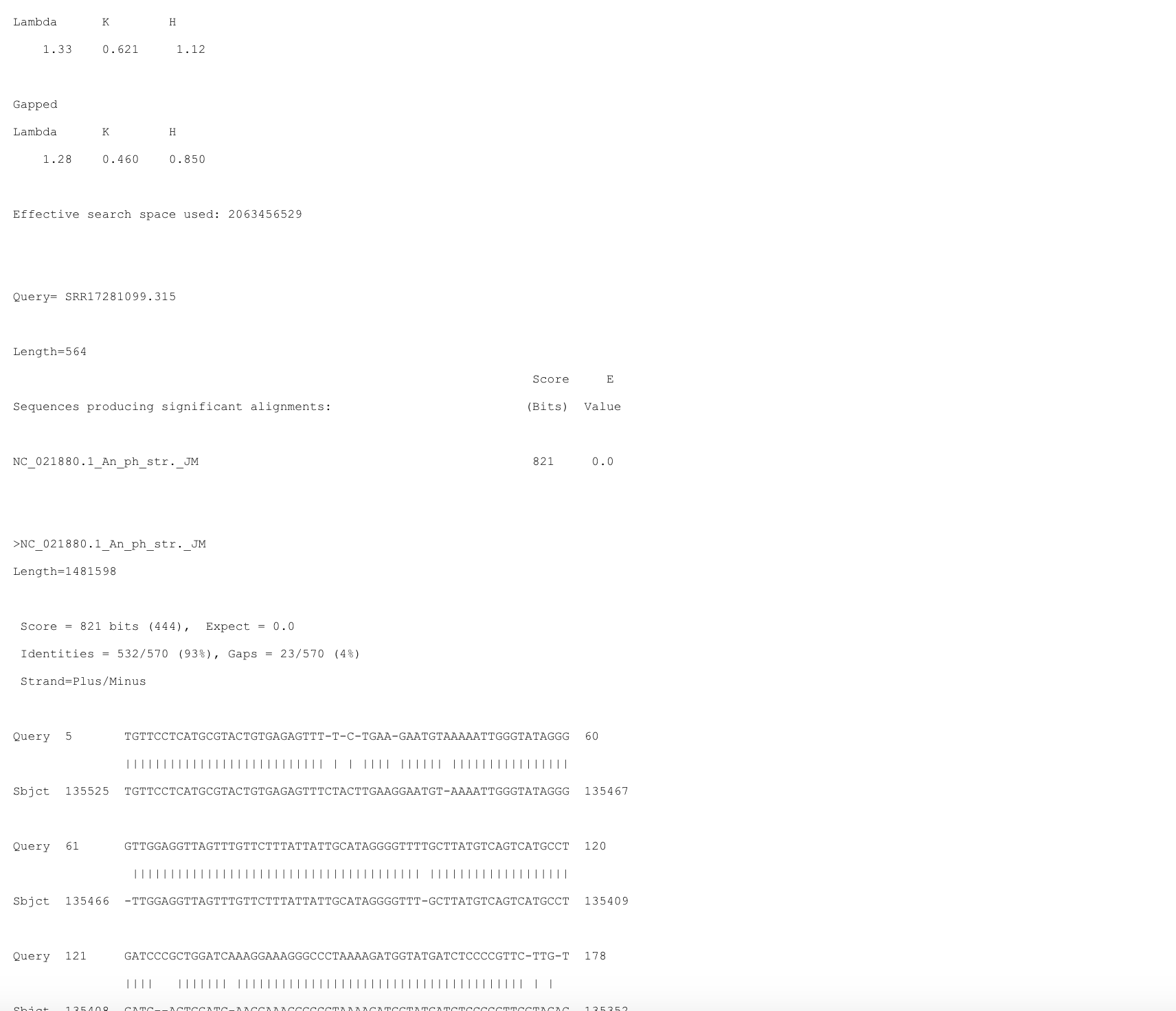
Lambda, K, H (Ungapped and Gapped)
Effective Search Space Used
Query
SRR17281099.315.Sequences Producing Significant Alignments
NC_021880.1_An_ph_str_JMScore
E-value (Expect Value)
Identities
Gaps
Strand
Alignment
|) indicate identical matches.Description: Filter matches output from BLAST to retain only the query sequences that matched a reference sequence with >97% identity.
awk -F'\t' '$3 > 97' output_example/Kipp_etal_blast_results_table.txt > summary_example/Kipp_etal_high_hits.txt

# awk is a text processing command that allows you to filter, extract, and manipulate data from structured text, such as by selecting specific fields from a file based on a delimiter, applying conditions, and performing actions on matching lines
# -F'\t' specifies tabs (\t) as the white-space character delimiting the input file
# Only rows where the value in the third field ($3) is greater than 97 are written to the output file
cut -f1 summary_example/Kipp_etal_high_hits.txt | sort | uniq > summary_example/Kipp_etal_high_hit_headers.txt

cut -f2 summary_example/Kipp_etal_high_hits.txt | sort | uniq > summary_example/Kipp_etal_high_hit_subjects.txt

# cut -f1 extracts the first field from the input file (e.g., HEADERS or individual read IDs), sorts all header names alphanumerically, and removes duplicates
	# cut -f2 extracts the second field from the input file (e.g., SUBJECTS or where the read hit), sorts all subject names alphanumerical, and removes duplicates
Initial steps to list the headers of sequences needed:
zcat data_example/SRR17281099.fasta.gz > data_example/SRR17281099.fasta

#zcat unzips the zipped fasta file

samtools faidx data_example/SRR17281099.fasta

#samtools faidx indexes

headers=`cat summary_example/Kipp_etal_high_hit_headers.txt`
Obtaining the subset of high perecentage matching sequences from the whole set of sequences.
samtools faidx data_example/SRR17281099.fasta $headers > summary_example/Kipp_etal_high_hit_sequences.fasta
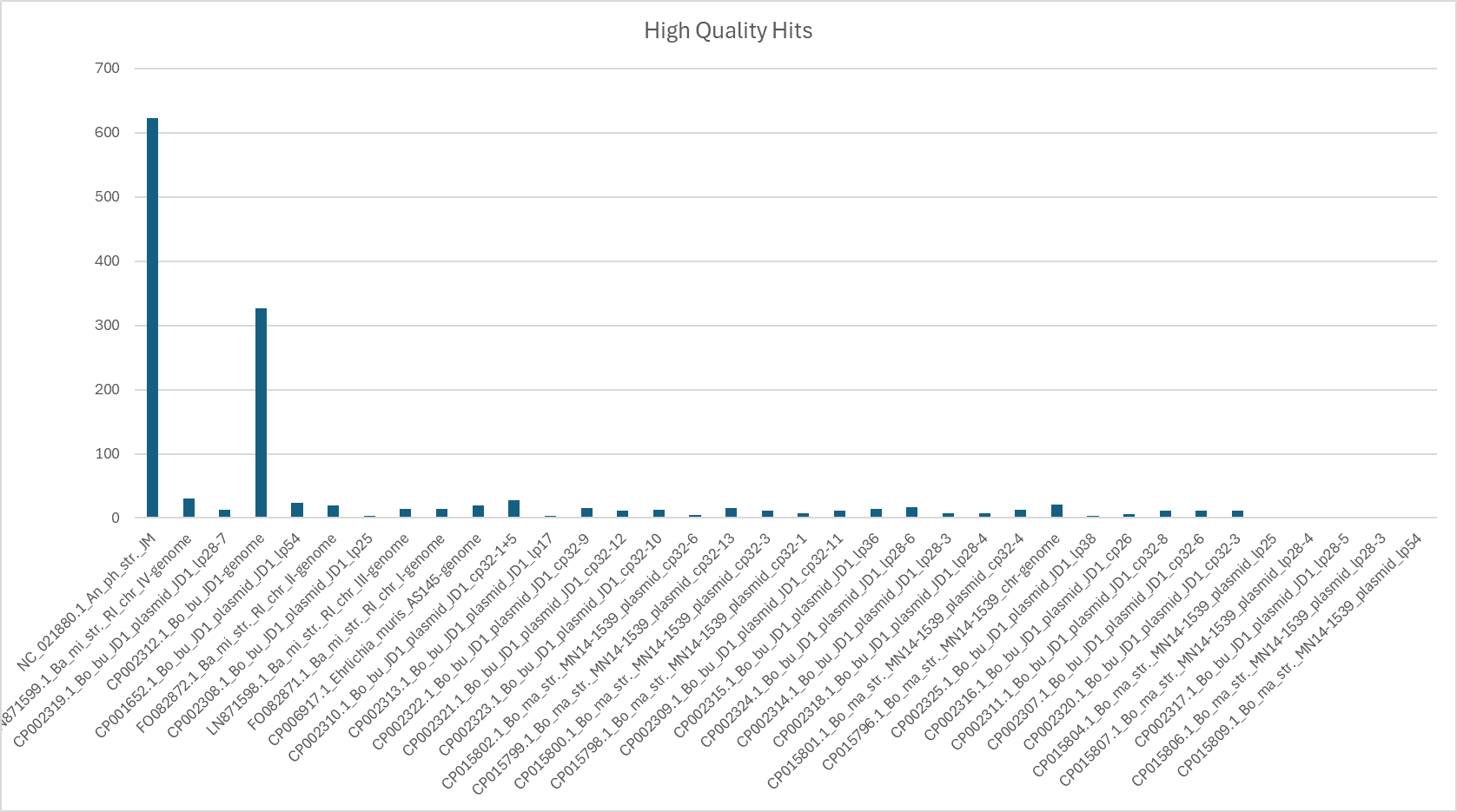
Below is a graph of the number of hits per reference pathogen sequence. Clearly, one sequence (NC_021880.1_An_ph_str._JM) is more common than the others.
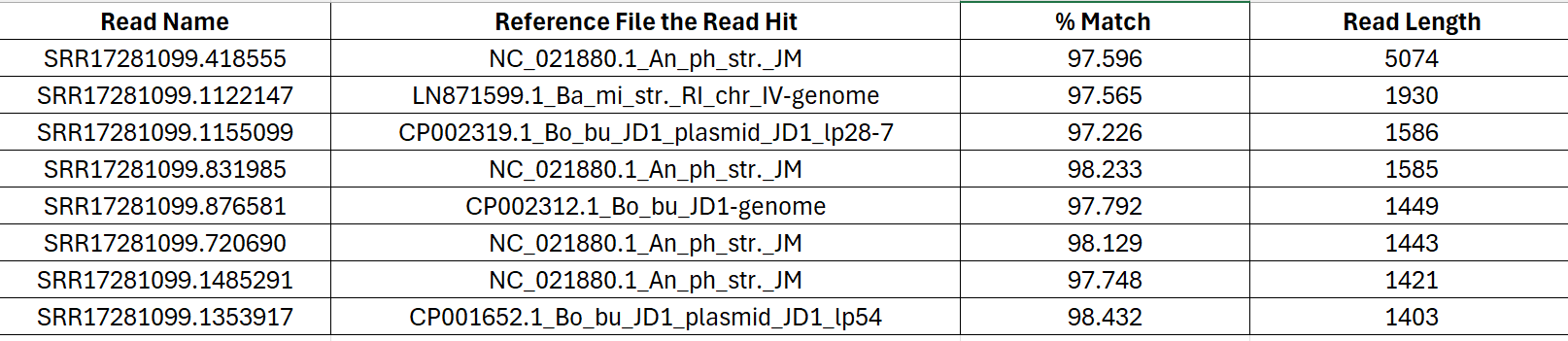
As an example, below a screenshot of the Kipp_etal_blast_results_table.txt output file. The data has been filtered based on % Match (e.g., percent identity) >97% and sorted by descending read length. The longest, high-quality match was also from NC_021990.1_An_ph_str._JM. Many of the reads are 200bp or less, and while they may have a higher % Match, the longer reads tend to have higher E value scores, thus are more informative for comparisons to the entire NCBI database.
Next, copy the read name associated with the longest, highest-quality match (SRR17281099.418555). Open the text file Kipp_etal_high_hit_sequences.fasta and use Ctrl-F to find that read in the file.:
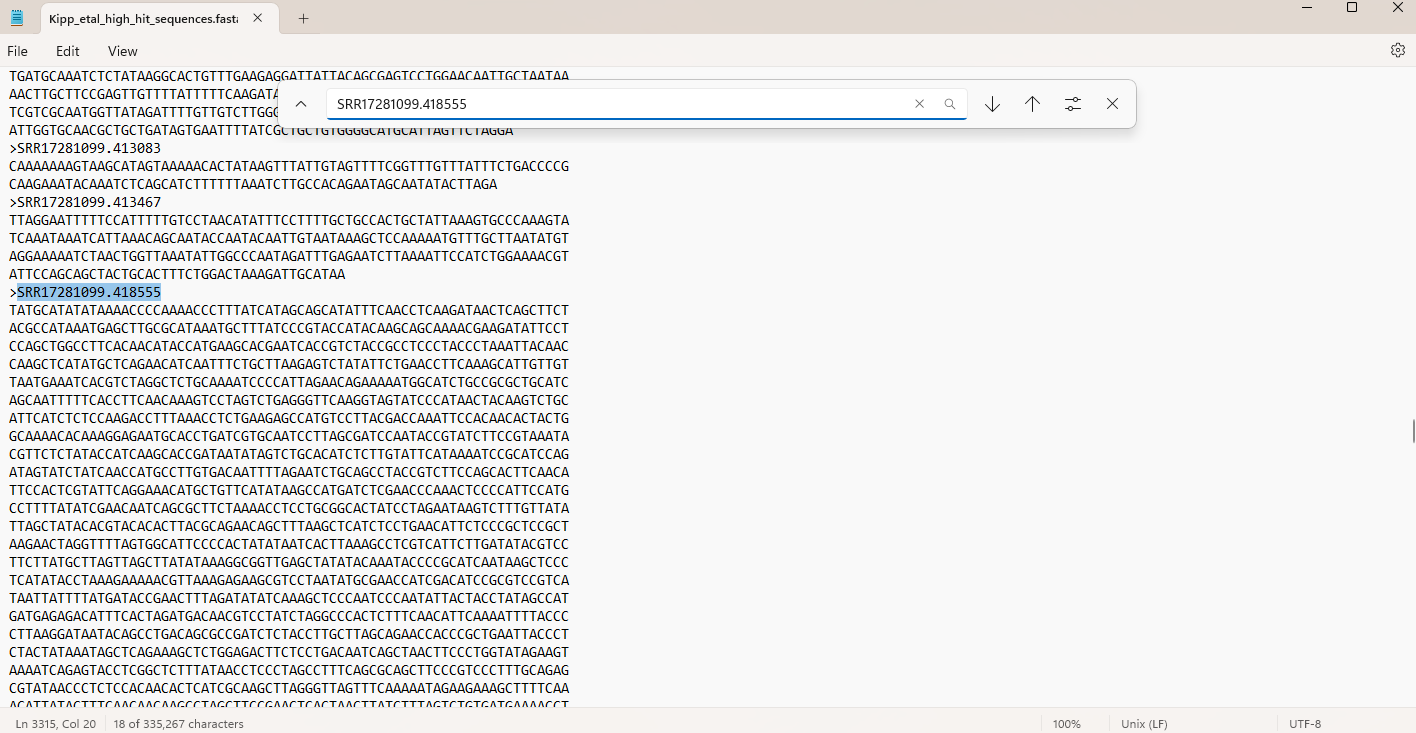
Once you’ve located that read in the Kipp_etal_high_hit_sequences.fasta file, copy the sequence and paste the sequence into NCBI BLAST
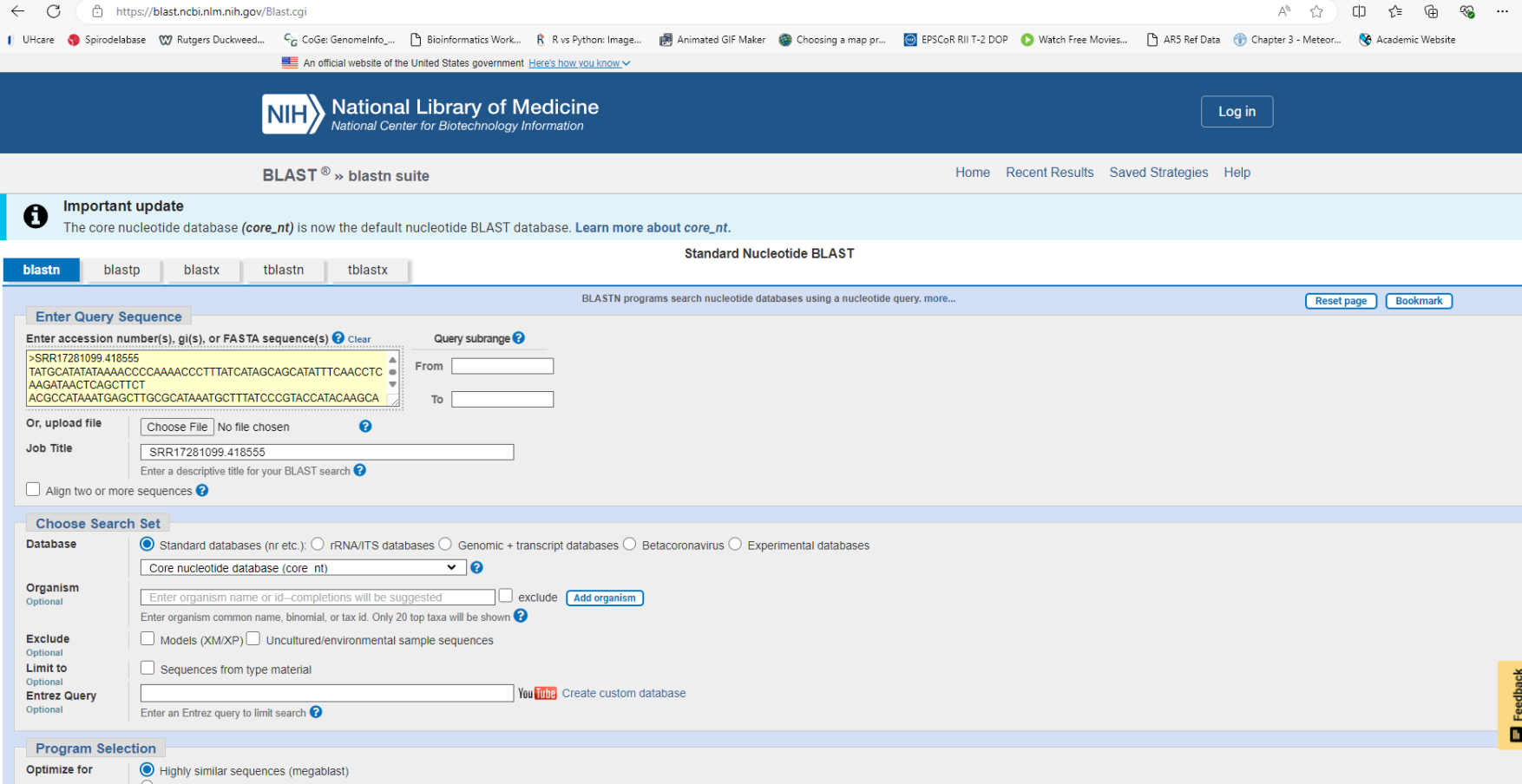
online (Enter accession number(s), gi(s), or FASTA sequence(s) box in the upper left corner) and press search. This will return similar sequences in GenBank, displayed as shown in the image below:
First, we paste out sequence into the nucleotide box:
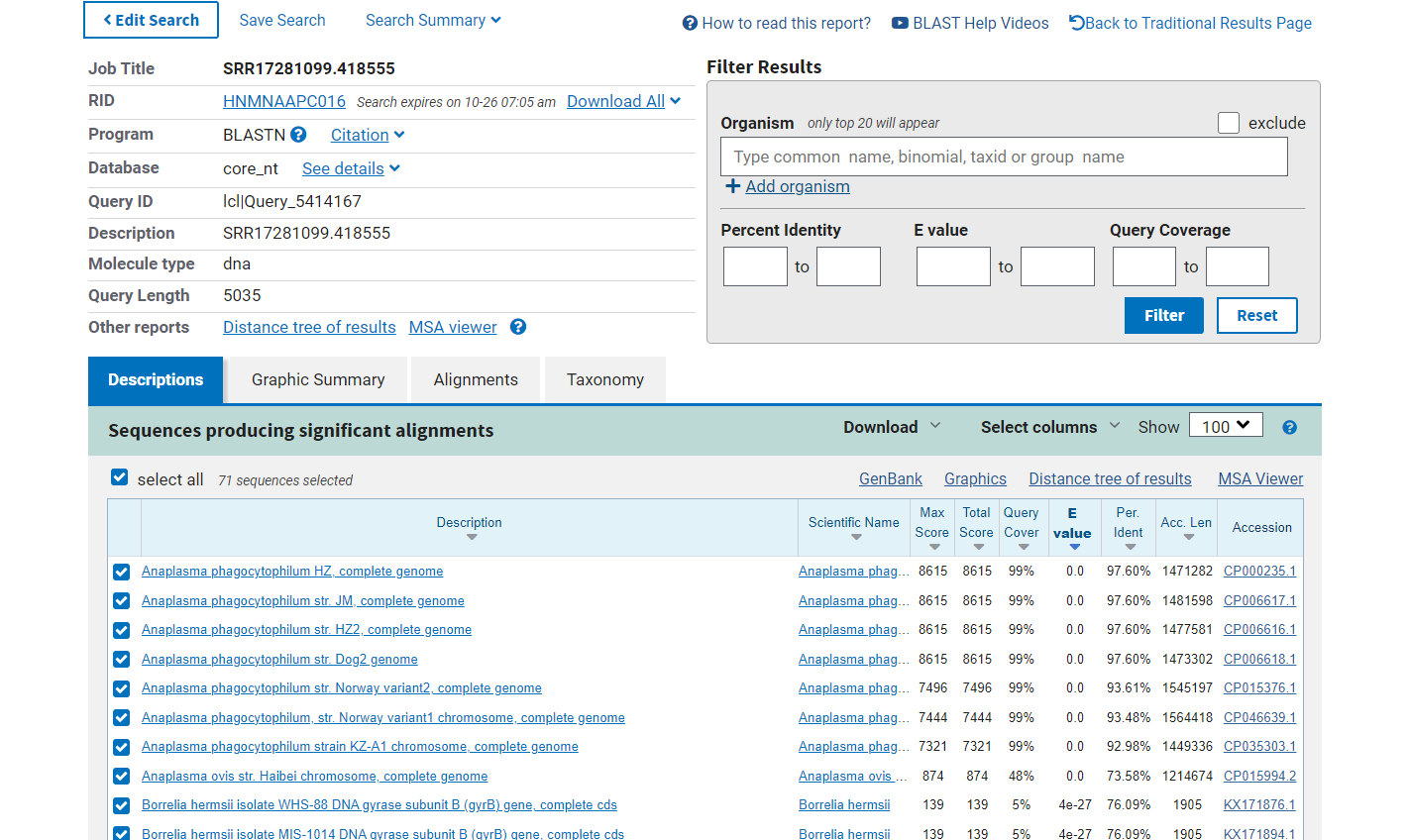
After searching, a results pane will show you results similar to what we had on the command line, but in a different format. In the top right panel, we can filter our hits by organism, percent identity, E value, and Query Coverage. The bottom panel shows all of the hits, sorted by E value by default. More information about each sequence that hit can be found by clicking the name in the Description column. There are also many options for viewing the alignments, such as in the Graphic Summary and Alignments tabs, or by clicking MSA viewer.
NCBI has a neat feature where you can view how your sequence (highlighted in yellow) compares to other uploaded sequences:
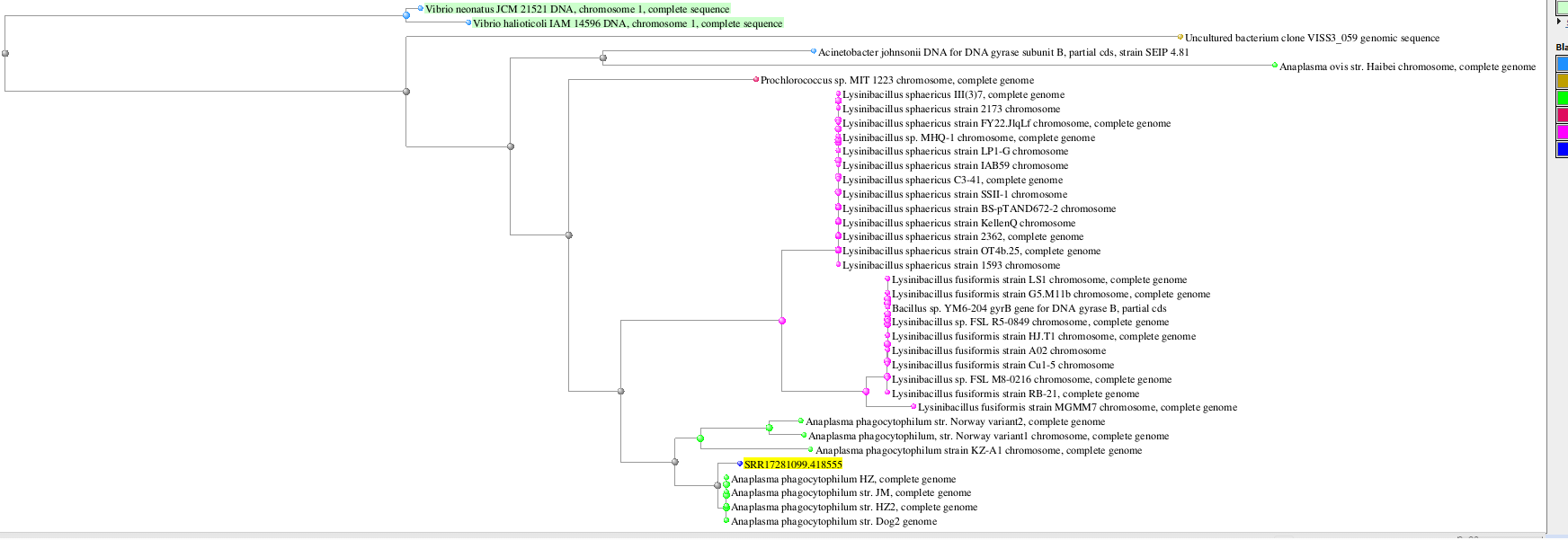
In this case, we can see that our longest read maps near-perfectly to a portion of an Anaplasma phagocytophilum reference genome , a Gram-negative bacterium that causes multiple diseases in cattle and sheep, as well as zoonoses like human granulocytic anaplasmosis. This result is consistent to those of Kip et. al 2023, which found evidence of the same bacteria in their approach that used the kraken2 package for metagenomic classification.
Description:
This section contains all of the code we will use to analyze the Nanopore sequence data generated during this workshop. This is not part of the worked example (above).
What we choose to sequence will depend on the diversity of mammals collected, and will lead to one of two workflows: (1) Pathogen Detection via Host-Depletion or (2) Cryptic species identification via mitogenome enrichment
Description: FLYE is a software tool used to assemble genomes from long DNA sequences without a reference file to base the alignments off of. It pieces together overlapping DNA reads to form a continuous sequence, even if the data is noisy or has gaps. For mitogenomes, FLYE helps combine these long reads into a complete mitochondrial genome, and sometimes reads may span the entire mitogenome, making FLYE’s aligning pretty easy.
#!/bin/bash
# Base directory for output
base_dir="/Users/mammalogy/Ecuador_Workshop/02_convert_bams_out"

# Output directory for basecalling results
output_dir="/Users/mammalogy/Ecuador_Workshop/03_flye_out"

mkdir $output_dir -p

conda activate base

for barcode in barcode{01..24}
# this loops over files named barcode01, barcode02, ..., barcode24
# The number of barcode files will depend on the number of individuals multiplexed and being analyzed simultaneously

do
  flye --genome-size 16000 --nano-hq $base_dir/$barcode.fastq --out-dir $output_dir/$barcode
doneDesription: The dorado package is a suite of tools tailored for working with long read, Nanopore sequence data. This is the aligning function in Nanopore in which we provide a reference genome or an idea of what the genome should look like. The reads are then aligned to that reference to create a file for each individual’s reads.
#!/bin/bash
# Base directory for output

#path for where you installed Dorado
dorado="/Users/mammalogy/Documents/software/dorado-0.7.0-osx-arm64/bin/dorado"

base_dir="/Users/mammalogy/Ecuador_Workshop/01_sup_out"

# Output directory for basecalling results
output_dir="/Users/mammalogy/Ecuador_Workshop/03_dorado_align_out/"

#Path to the reference file you want to align to
reference_path="/Users/mammalogy/Ecuador_Workshop/Peromyscus_mito/pero_mito.txt"

mkdir $output_dir -p

for barcode in barcode{01..24}

do
  $dorado aligner $reference_path $base_dir/$barcode.bam | samtools sort > $output_dir/$barcode.bam
done

# The " | " is a pipe command. It sends the output of the alignment into the samtools sort funtion. This function puts our reads in order so we can create a consensus sequence on the next step. for barcode in barcode{01..24}
do
# Pull consensus sequence sequence of the sample out of the alignment (BAM) file
samtools consensus -a --min-MQ 10 --min-BQ 10 $output_dir/$barcode.bam > $output_dir/$barcode.fasta
#-a include all positions
#-min-MQ minimum mapping quality
#-min-BQ minimum base quality
doneDescription: Rename the header in each fasta file by the name of the fasta file
# Loop through a series of barcode numbers from 01 to 24
for barcode in barcode{01..24}

do
    # For each barcode, find lines in the file that start with ">", which indicates the name of a sequence in a FASTA file.
    # Replace this part (">") with a new name that includes the barcode number (e.g., barcode01, barcode02, etc.).
    # This will rename the sequences based on their barcode and save them to a new file.
    sed 's/^>.*/>'${barcode}'/' $output_dir/$barcode.fasta > $output_dir/$barcode.rename.fasta

done

# Combine (concatenate) all the renamed sequences into a single file called "concatenated.fasta"
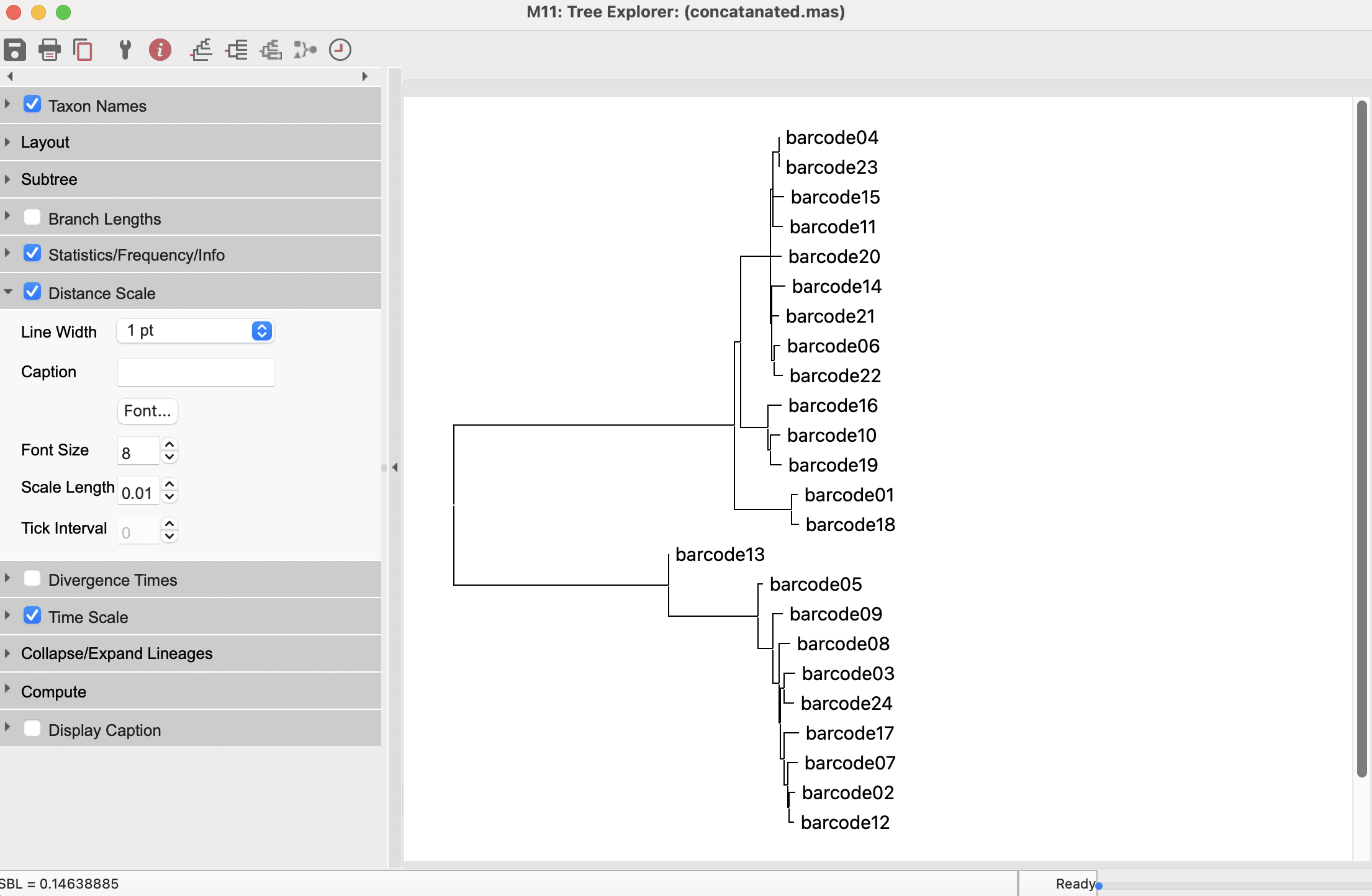
cat $output_dir/*.rename.fasta > $output_dir/concatanated.fastaDescription: MEGA (Molecular Evolutionary Genetics Analysis) is a bioinformatics software suite used to analyze and visualize molecular sequence data to study evolutionary relationships. It provides tools for constructing phylogenetic trees, estimating divergence times, and testing evolutionary hypotheses using nucleotide and protein sequences.
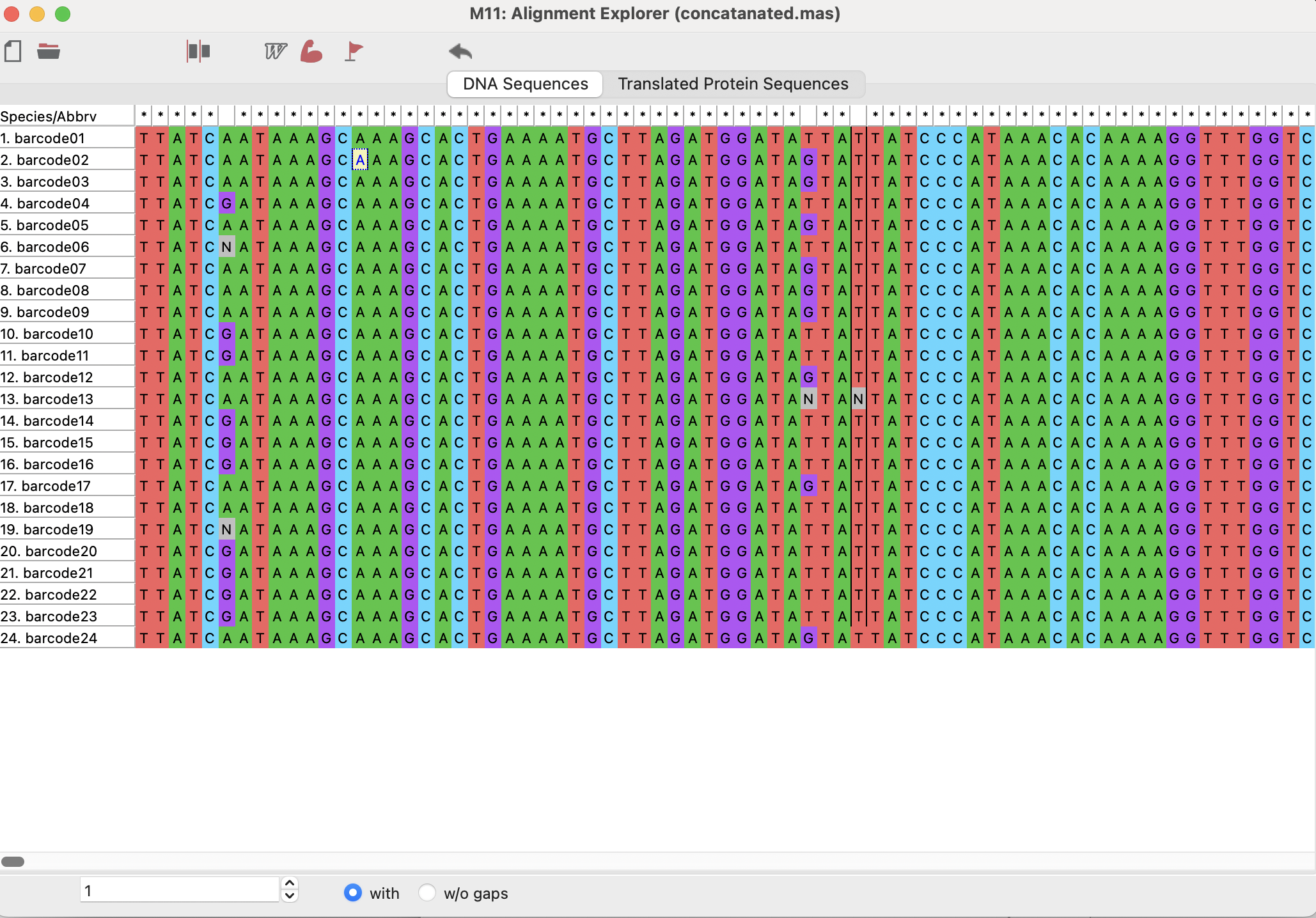
Here, we imported concatanated.fasta into the MEGA Alignment explorer. Each barcode is a row and in that row are all of the nucleotide bases in order, alinged to eachother. Each base is a different color, with N’s representing bases of unknown identity.